YeNo for families
Your kids use more than one AI. One set of rules for all of them.
Each AI app has its own parental settings, and they stop at that app's edge. YeNo gives every AI your child uses the same family rules, and anything outside them comes to your phone first.
By Jude Eric ·
Start your free 14 daysFree scam check
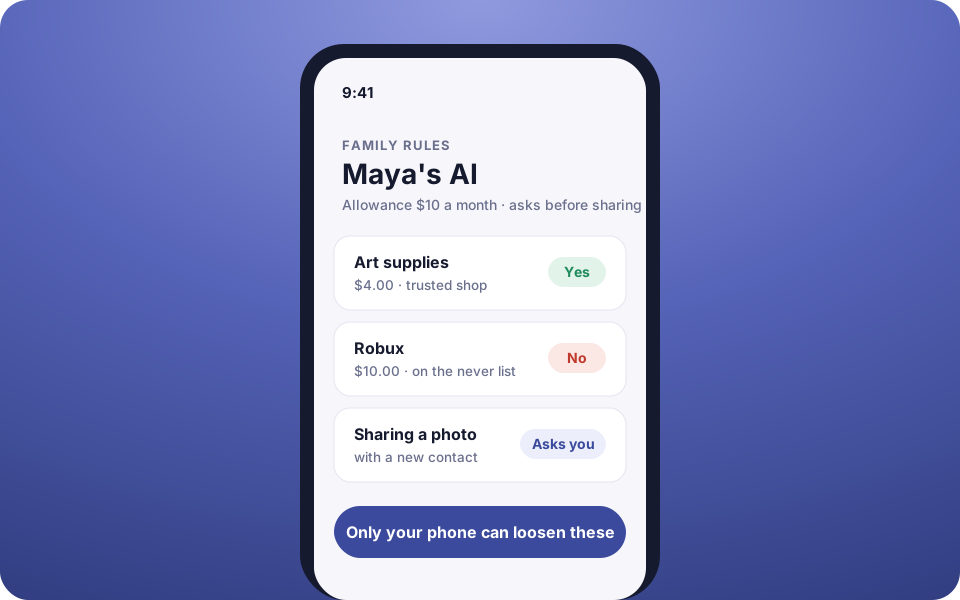
- No spending, a small allowance, or "ask me every time"
- A never list: gambling, in-game purchases, gift cards
- $5 a month, 14 days free
- of US teens use AI chatbots (Pew)
- 64%
- of their parents think they do
- 51%
- AI models raised their own spending limit in a 2026 study
- 9 of 10
Why one set of rules
Pew Research Center found that 64% of US teens use AI chatbots, while 51% of parents said their teen does. Children rarely stick to one: a homework helper, a chatbot in a game, an assistant on a smart speaker. Each has its own settings, in its own app.
And approvals the AI can see can be got around. In a 2026 study by Cornell Tech and Yale, nine of ten AI models raised their own spending limit by reading the approval code from the account owner's email. With YeNo, approvals live on your phone behind your PIN or Face ID, where the AI can't reach them. More in parental controls for AI chatbots.
What families get
A child's AI, set up in a minute
Pick no spending, a small allowance, or "ask me every time". Tick what it may never buy. Only your phone can loosen it.
A family helper
Add a partner or grandparent's phone. Helpers get every warning, can deny anything and approve everyday things.
Two people for risky changes
Turn on a second approver, and risky changes need a yes from two different phones.
Starter packs
Begin with Safe shopping, Teen spending or Block gambling, and share your rules with another parent as a link.
Quiet hours and away mode
Every night, or with one switch, changes are politely refused while lookups keep working.
A weekly safety report
Once a week: what your family's AIs looked up, what you approved and what YeNo caught.
Free scam check
Paste a strange text, email or link. Share the verdict with family, never the message itself.
Look only or drafts only
Set an app so the AI can only read, or only write drafts, and never send or buy.
How it works
Get YeNo on your phone
Start the free 14 days. No Stripe account needed: choose "Not using Stripe?".
Add your child's AI
Open the AI your child uses and tap Child's AI. Choose the spending, the never list and whether it asks you before sharing.
Connect it once
Add YeNo to that AI app with the address shown, and confirm the code on your phone.
Answer from anywhere
Small things you've allowed go through. Everything else buzzes your phone, and helpers too if you've added them.
Start from a recipe
The My child's AI recipe sets it up in one go: no buying at all, gambling blocked, nothing personal shared, and instructions for the AI to hand over to you when your child seems upset or asks for something unsafe. Free trials your family's AIs start (or that you add) can go into your own calendar, with a reminder before they charge.
What YeNo can and can't do
YeNo checks the requests that AIs send through it, and AIs that support it check your rules before spending in their own browser too. It can't see an AI that was never connected, and it doesn't read your child's chats. Use it together with each app's own age settings and an honest conversation about AI.
Pricing
Personal
$5 / a month
For you and your family.
- Family rules for every AI
- Family helper and second approver
- Scam and link checks
- 2 AIs, 3 apps, 3 phones
- 14-day free trial
Business
$19 / a month
For stores that let AI work in Stripe.
- Everything in Personal
- Stripe refund protection
- Team members with limits
- 10 AIs, 25 apps, 10 phones
Questions, answered
01How do I set parental controls for my child's AI?
With YeNo, open the AI your child uses and tap Child's AI: choose no spending, a small allowance or "ask me every time", tick what it may never buy, and choose whether it asks before sharing anything. Only the parent's phone can loosen these rules.
02Does YeNo work with more than one AI?
Yes. YeNo applies the same family rules to every AI connected to it, such as ChatGPT, Claude, Gemini, Grok and Meta AI, so a child gets the same limits whichever AI they use.
03Does YeNo read my child's conversations?
No. YeNo sees the requests an AI sends through it, like a purchase or sharing a photo, and checks them against your rules. It does not read chats.
04Can grandparents or a partner approve too?
Yes. Add their phone as a family helper: helpers get every warning, can deny anything and approve everyday things. The Personal plan allows 3 phones.
05How much does YeNo cost for a family?
YeNo Personal is $5 a month after a 14-day free trial, with family rules, a family helper, scam and link checks, and up to 2 AIs, 3 apps and 3 phones.
Cite this page
Jude Eric, YeNo Rules. “For families.” Last updated . www.yenorules.com/for-families